
Laravel 11 vs Laravel 12: Full Upgrade Guide
If you've been putting off upgrading your Laravel application, you're not alone. There's something quietly intimidating about touching a live codebase especially when it powers real users, real revenue, or a client who expects zero downtime. But here's what years of working through Laravel upgrades across 200+ client projects has taught me: the fear is always bigger than the actual work.
This guide walks you through everything from understanding what actually changed between Laravel 11 and Laravel 12, to running your first composer update with confidence, to deploying a fully upgraded app without breaking a single feature. Whether you're jumping from Laravel 10 to 11, or taking the leap straight to Laravel 12, this is the only guide you'll need in 2026.
Not sure if Laravel is even the right framework for your current project? Read this first: Laravel vs WordPress: which is right for you, it might save you a week of work before you even begin upgrading.
Let's get into it.
Laravel 11 vs Laravel 12: What's Actually Different?
Before you run a single command, it helps to understand why this upgrade matters and what you're walking into.
A Quick Version Timeline
Laravel follows a predictable annual release cycle. Understanding the support windows helps you make smarter decisions about when and whether, to upgrade.
| Version | PHP Requirement | Bug Fixes Until | Security Fixes Until |
|---|---|---|---|
| Laravel 10 | ^8.1 | August 2024 | February 2025 |
| Laravel 11 | ^8.2 | September 2025 | March 2026 |
| Laravel 12 | ^8.2 | March 2026 | March 2027 |
If you're still running Laravel 10, its security support window has already closed. That's not a technicality, that's real exposure.
Why the Upgrade Actually Matters
It's tempting to treat a major version bump as optional housekeeping. It isn't. Here's what you're leaving on the table by staying on an older version:
- Security patches stop coming. Once a version hits end-of-life, known vulnerabilities go unpatched in your codebase.
- Modern packages move on. Many Laravel packages now require Laravel 11+ or 12+. Staying behind means locking yourself out of the ecosystem.
- Performance improvements are real. Laravel's routing, caching layer, and database abstractions improve with every major release.
- Future upgrades get harder the longer you wait. Skipping from Laravel 9 to 12 in one jump is painful. Staying current keeps each upgrade manageable.
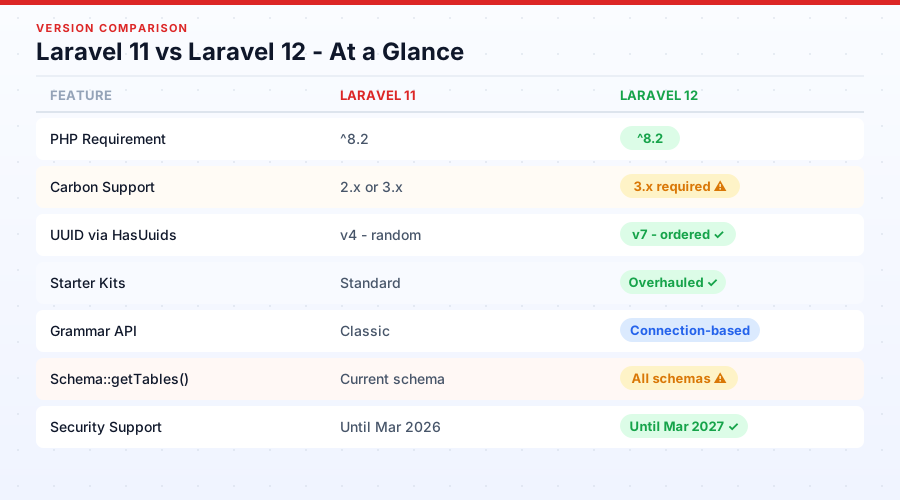
Laravel 11 vs Laravel 12 - At a Glance
| Feature | Laravel 11 | Laravel 12 |
|---|---|---|
| PHP Requirement | 8.2+ | 8.2+ |
| App Structure | Streamlined (1 AppServiceProvider) | Same + refined |
| UUID Default | v4 | v7 (ordered) |
| Carbon Version | 2.x or 3.x | 3.x required |
| Starter Kits | Standard | Overhauled |
| Key Focus | Simplification | AI-readiness & DX |
| Breaking Changes | Moderate | Moderate (targeted) |
Should You Upgrade Right Now?
Not every upgrade needs to happen today. Here's an honest framework.
Upgrade If…
- Your application is actively developed and maintained
- You depend on a package that now requires Laravel 11 or 12
- You have a working test suite (or can build one quickly)
- You want continued security support beyond early 2026
- You're starting a new feature sprint and want a clean foundation
Hold Off If...
- The project is in a frozen, stable state with no planned development
- You have zero test coverage and no staging environment
- Your custom packages or third-party integrations haven't released Laravel 12-compatible versions yet
- There's no business justification for the risk right now
The Smart Way to Approach It
For small projects, a single afternoon is often enough. For larger codebases, especially enterprise apps with custom database drivers, complex queues, or payment integrations, plan a proper sprint. Create a dedicated upgrade/laravel-12 branch, clone your production database to staging, and treat this like any other high-risk deployment. Because it is one.
Tools like Laravel Shift can automate a significant portion of the changes in the official upgrade guide, which brings the time investment down dramatically, more on that in Section 9.
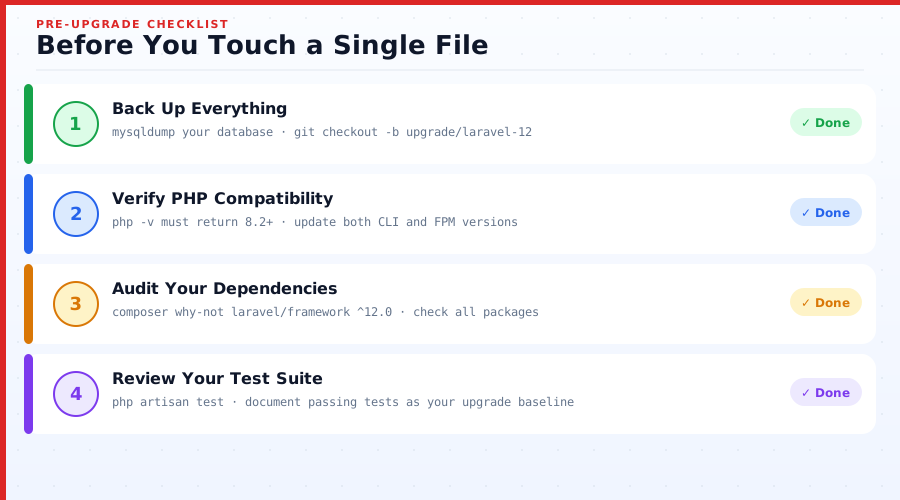
Pre-Upgrade Checklist: Before You Touch a Single File
This section is the most skipped and the most important. Don't start until you've worked through every item here.
Step 1: Back Up Everything
This sounds obvious. People still skip it. Don't.
Database backup:
mysqldump -u root -p your_database_name > backup_$(date +%Y%m%d).sqlCreate a dedicated upgrade branch in Git:
git checkout -b upgrade/laravel-12
git push origin upgrade/laravel-12
If you're on a VPS or dedicated server, take a full snapshot before proceeding. Most cloud providers (DigitalOcean, AWS, GCP) allow one-click snapshots from the dashboard.
Step 2: Verify PHP Compatibility
Both Laravel 11 and Laravel 12 require PHP 8.2 as a minimum. PHP 8.3 is also fully supported and recommended for new builds.
Check your current PHP version:
php -vIf you're on PHP 8.1 or lower, upgrade PHP first before touching your Laravel version. Attempting both simultaneously is a recipe for difficult-to-diagnose errors.
Upgrading PHP on Ubuntu/Debian:
sudo apt update
sudo apt install php8.2 php8.2-cli php8.2-fpm php8.2-mysql php8.2-xml php8.2-mbstring
For cPanel environments, PHP version management is handled through MultiPHP Manager in WHM. For cloud hosting (Cloudways, Forge), use the server dashboard to switch PHP versions per application.
Step 3: Audit Your Dependencies
This is where most upgrade headaches actually come from, not Laravel itself, but the packages around it.
Run this command to identify conflicts before changing anything:
composer why-not laravel/framework ^12.0Common packages that require version updates alongside Laravel:
| Package | Laravel 11 Version | Laravel 12 Version |
|---|---|---|
| laravel/passport | ^11.0 | ^12.0 |
| laravel/sanctum | ^3.3 | ^4.0 |
| laravel/cashier-stripe | ^14.0 | ^15.0 |
| laravel/spark-stripe | ^4.0 | ^5.0 |
| nesbot/carbon | ^2.0 or ^3.0 | ^3.0 (required) |
Two packages were removed from Laravel's core dependencies and may cause errors if referenced directly:
doctrine/dbal- no longer required for schema operationsspatie/once- removed from framework internals
Step 4: Review Your Test Suite
Before upgrading, run your existing test suite and document which tests pass. This becomes your baseline for validation after the upgrade.
php artisan testIf you have no tests, identify at minimum the three most critical user flows (login, checkout, form submission. Whatever applies to your app) and test them manually before and after the upgrade.
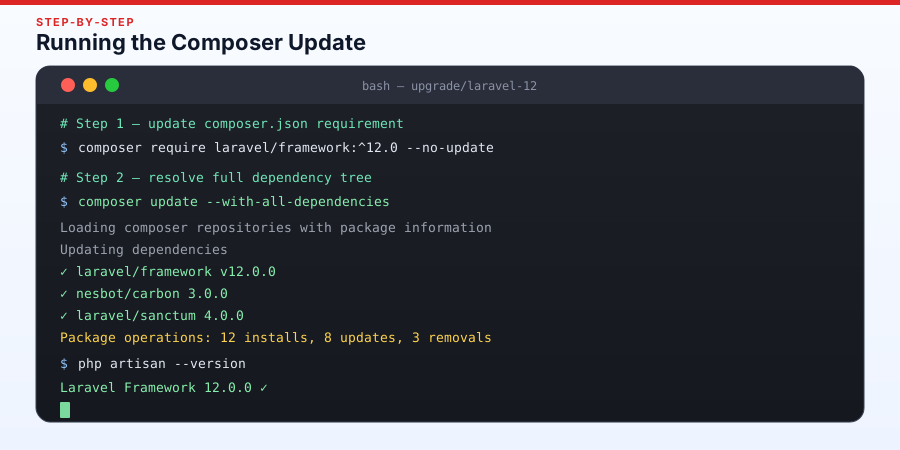
Upgrading to Laravel 11: Step-by-Step
This is the section most developers come here for, let's walk through it properly.
Step 1: Update composer.json
Open your composer.json and update the framework requirement:
"require": {
    "php": "^8.2",
    "laravel/framework": "^11.0",
    "laravel/sanctum": "^4.0"
}
Also update any other packages listed in your checklist from Section 4.
Step 2: Run Composer Update
composer update --with-all-dependenciesThe --with-all-dependencies flag allows Composer to resolve the full dependency tree freely, which prevents a lot of version lock conflicts.
If you encounter unresolvable conflicts, isolate them one package at a time rather than running the full update blindly.
Step 3: Understand the New Application Structure
This is the change that surprises most developers upgrading to Laravel 11 for the first time.
Laravel 11 introduces a significantly simplified application structure. The five default service providers from Laravel 10 are gone:
AuthServiceProviderBroadcastServiceProviderEventServiceProviderRouteServiceProviderAppServiceProvider(survives - this is now the only one)
Their responsibilities have moved into bootstrap/app.php, which is now the central configuration point for middleware, exceptions, routing, and service bindings.
Two important notes:
- Existing Laravel 10 applications do NOT need to restructure. Laravel 11 fully supports the old directory layout. You only adopt the new structure for fresh installs or if you choose to migrate manually.
api.phpandchannels.phpare no longer scaffolded by default. They still work, they're just not auto-loaded unless you publish them:
php artisan install:api
php artisan install:broadcasting
Step 4: Update Configuration Files
Compare your existing config files against the Laravel 11 defaults. The easiest way is via GitHub:
https://github.com/laravel/laravel/compare/10.x...11.xKey changes to review:
config/app.php- providers array is now minimalconfig/auth.php- minor updates to guard structure.env.example- new environment variables added
Republish vendor configs where needed:
php artisan vendor:publish --forceStep 5: Update Routing
Route model binding and API route registration now live in AppServiceProvider by default in fresh Laravel 11 installs. If you're migrating from an existing Laravel 10 app, your RouteServiceProvider will continue working without changes.
For teams adopting the new structure, register routes like this in bootstrap/app.php:
->withRouting(
    web: __DIR__.'/../routes/web.php',
    api: __DIR__.'/../routes/api.php',
    commands: __DIR__.'/../routes/console.php',
    health: '/up',
)
Step 6: Run Migrations
After updating package versions, publish and run any new migrations:
# Sanctum
php artisan vendor:publish --tag=sanctum-migrations

# Passport
php artisan vendor:publish --tag=passport-migrations

# Cashier Stripe
php artisan vendor:publish --tag=cashier-migrations

# Run all pending migrations
php artisan migrate
Always run migrations on staging first. Review every migration file before executing on production.
Step 7: Test Everything
php artisan testBeyond your test suite, manually verify:
- User registration and login flows
- API authentication (Sanctum / Passport)
- Payment processing if using Cashier
- Queue workers and scheduled tasks
- File uploads and storage operations
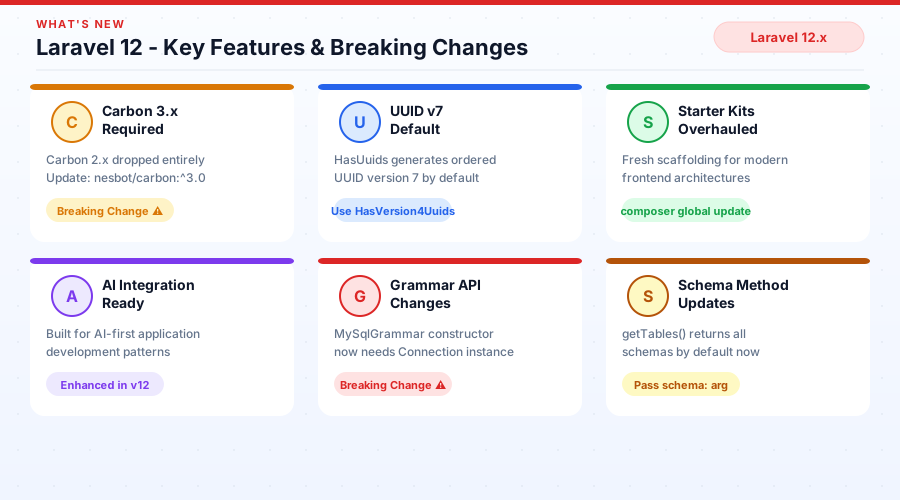
What's New in Laravel 12: Features Worth Knowing
Laravel 12 isn't a dramatic departure from 11, it's a refinement, a cleanup, and a strategic push toward AI-native development. Here's what actually changed.
Starter Kits Overhaul
Laravel 12 ships with completely overhauled starter kits. The new kits are cleaner, more opinionated, and better suited to modern frontend architectures. To make sure you have access to the latest kit scaffolding, update your global Laravel installer:
composer global update laravel/installerIf you're encountering issues, a clean reinstall via php.new will get you the latest version.
Carbon 3.x Is Now Required
This is one of the breaking changes that catches teams off guard. Laravel 12 drops support for Carbon 2.x entirely. If your codebase uses Carbon methods that were deprecated or changed between versions, you'll see errors after upgrading.
Update your composer.json:
"nesbot/carbon": "^3.0"Then audit your code for any Carbon 2.x-specific method usage. The most common breaking changes involve:
CarbonIntervalstring casting behaviordiffForHumans()option parameters- Certain static helper methods that were removed
UUID Version 7 via HasUuids Trait
In Laravel 11 and below, the HasUuids trait generated UUID v4 (random UUIDs). Laravel 12 changes the default to UUID v7, which is time-ordered.
This matters for database performance, ordered UUIDs reduce index fragmentation on large tables, which translates to faster writes and more predictable query plans.
However, if you have existing records with UUID v4 and need to maintain consistency, switch to the new HasVersion4Uuids trait:
use Illuminate\Database\Eloquent\Concerns\HasVersion4Uuids;

class User extends Model
{
    use HasVersion4Uuids;
}
Grammar & Database Changes
This is the most technically breaking change in Laravel 12 for teams with custom database drivers.
MySqlGrammar constructor now requires a Connection instance. If you've extended any grammar class, your constructor signature needs updating.
Deprecated and removed APIs:
Blueprint::getPrefix()- deprecated, use$connection->getTablePrefix()insteadConnection::withTablePrefix()- removedGrammar::getTablePrefix()/Grammar::setTablePrefix()- deprecatedGrammar::setConnection()- removed
The new pattern for retrieving table prefix:
// Before (deprecated)
$grammar->getTablePrefix();

// After (correct)
$connection->getTablePrefix();
Schema Method Changes
Three schema methods now behave differently in Laravel 12:
Schema::getTables()- now returns tables across all schemas by default, not just the current oneSchema::getViews()- same multi-schema behaviorSchema::getTypes()- same
If your code relies on these returning only the current schema's objects, pass the schema argument explicitly:
Schema::getTables(schema: 'your_schema_name');Additionally, Schema::getTableListing() now returns schema-qualified table names (e.g., public.users instead of users). Update any string comparisons in your code accordingly.
Laravel 12 and AI Integration
One of the most exciting directions in Laravel 12 is its positioning as a first-class framework for AI-powered applications. If you're building AI features into your Laravel app, the ecosystem support has grown significantly.
Want to go deeper on this? The Laravel AI SDK integration guide walks through adding AI capabilities to your Laravel 12 application step by step.
Upgrading from Laravel 11 to Laravel 12 : Step-by-Step
If you've already completed the Laravel 11 upgrade above, this section is your next step. If you're jumping directly from Laravel 10, complete Part 1 first, skipping steps makes debugging significantly harder.
Step 1: Update composer.json
"require": {
    "php": "^8.2",
    "laravel/framework": "^12.0",
    "nesbot/carbon": "^3.0"
}
Step 2: Update the Laravel Installer
composer global update laravel/installerVerify the update:
laravel --versionStep 3: Update Carbon to 3.x
composer require nesbot/carbon:^3.0After updating, run your test suite specifically targeting any date/time-heavy areas of your application. Carbon 3 is not always drop-in compatible with Carbon 2 code.
Step 4: Handle UUID Changes
Search your models for HasUuids:
grep -r "HasUuids" app/Models/For each model, decide:
- New model or data doesn't require v4 consistency? → Keep
HasUuids(now UUID v7) - Existing data in production using UUID v4? → Switch to
HasVersion4Uuids
// To maintain UUID v4 behavior
use Illuminate\Database\Eloquent\Concerns\HasVersion4Uuids;
Step 5: Fix Grammar & Database API Changes
Search your codebase for deprecated method calls:
grep -r "getTablePrefix\|setTablePrefix\|withTablePrefix\|setConnection" app/ database/Update each occurrence to use the new connection-based approach. If you've built custom database drivers or macros, this will require the most attention.
Step 6: Resolve Schema Method Changes
Search for getTables, getViews, getTypes, and getTableListing usage:
grep -r "Schema::getTables\|Schema::getViews\|Schema::getTypes\|getTableListing" app/ database/Add explicit schema arguments where needed, and update any string-matching logic against getTableListing() results to handle schema-qualified names.
Step 7: Update Starter Kit Configuration
This only applies to projects scaffolded with a Laravel starter kit. Review the new kit defaults and merge any configuration changes that apply to your setup.
Step 8: Run Tests and Confirm the Upgrade
php artisan --version
# Should return: Laravel Framework 12.x.x

php artisan test
Before pushing to production, run through your full manual QA checklist on staging. Especially test:
- Database queries on large tables (UUID index behavior)
- Any custom grammar or database driver functionality
- Date/time operations relying on Carbon
- Schema introspection if your app uses it
Common Errors During Laravel Upgrade (and How to Fix Them)
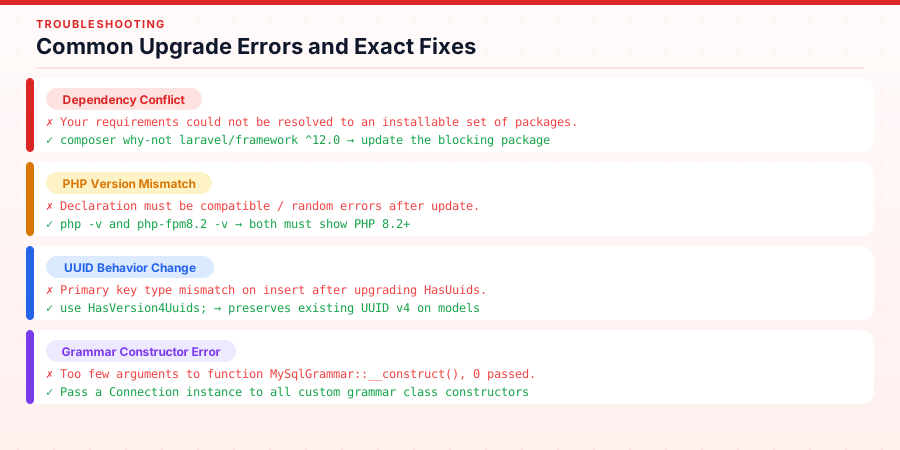
Even with proper preparation, errors happen. Here are the most common ones and exactly how to resolve them.
Dependency Conflict Errors
Error:
Your requirements could not be resolved to an installable set of packages.Fix:
composer why-not laravel/framework ^12.0This command tells you exactly which package is blocking the resolution. Update that package first, then re-run composer update. If a package hasn't released a Laravel 12-compatible version, check its GitHub issues for a fork or temporary replacement.
PHP Version Mismatch
Symptoms: Random fatal errors after update, Declaration must be compatible with notices
Fix: Verify your CLI PHP and web server PHP are both on 8.2+:
php -v           # CLI version
php-fpm8.2 -v    # FPM version
A common mistake is upgrading CLI PHP but not the FPM version used by Nginx or Apache.
Missing Migration Files After Package Upgrade
Several packages (Cashier, Passport) now require you to manually publish their migrations rather than auto-loading them.
php artisan vendor:publish --tag=cashier-migrations
php artisan vendor:publish --tag=passport-migrations
php artisan migrate --pretend   # Preview changes before running
php artisan migrate
UUID-Related Model Errors
Error: Primary key type mismatches on insert, or duplicate key violations after UUID behavior change
Fix: Add HasVersion4Uuids to models that need to maintain UUID v4 behavior for existing data. Never let UUID behavior change on a model that already has production records without a migration plan.
Grammar/Database Driver Constructor Errors
Error:
Too few arguments to function MySqlGrammar::__construct(), 0 passedFix: Update your custom grammar class constructors to accept and pass a Connection instance. Refer to Laravel 12's built-in grammar classes on GitHub as a reference implementation.
Carbon Method Deprecation Warnings / Errors
Common removed methods in Carbon 3:
CarbonInterval::cascade()behavior changed- Some modifier strings changed syntax
Check the official Carbon 3 migration notes and search your codebase for Carbon usage patterns flagged in their changelog.
Tools to Make Your Laravel Upgrade Easier
You don't have to do all of this by hand. These tools remove a large portion of the manual effort.
Laravel Shift: Automated Upgrade Assistant
Laravel Shift is the most valuable tool in any Laravel developer's upgrade toolkit. It analyzes your codebase and automatically applies the changes documented in Laravel's official upgrade guide from updating composer.json to restructuring service providers to handling deprecated method calls.
Available Shifts include:
- Laravel 5.x → 12.x (all versions)
- PHP version upgrades
- Laravel Mix → Vite migration
- PHPUnit → Pest migration
- Tailwind CSS version upgrades
At $99/year for unlimited Shifts across all your projects, it pays for itself on the first upgrade if your time is worth anything.
GitHub Comparison Tool
Before touching any config file, use GitHub's comparison view to see exactly what changed between framework versions:
https://github.com/laravel/laravel/compare/10.x...12.xThis shows every default file change so you can surgically apply only what's relevant to your project.
Tinkerwell
If you're debugging unexpected behavior after an upgrade, Tinkerwell gives you a fast, GUI-based PHP/Laravel REPL. You can test Carbon date behavior, query builder output, and model interactions without spinning up a full request cycle.
Laravel Telescope
Deploy Telescope to your staging environment post-upgrade. It logs every query, exception, queued job and mail, giving you a clear view of what's changed in behavior without needing to reproduce issues manually.
Post-Upgrade Performance & SEO Best Practices
The upgrade isn't complete when the tests pass. A few more steps ensure your app is performing at its best.
Core Web Vitals After Upgrade
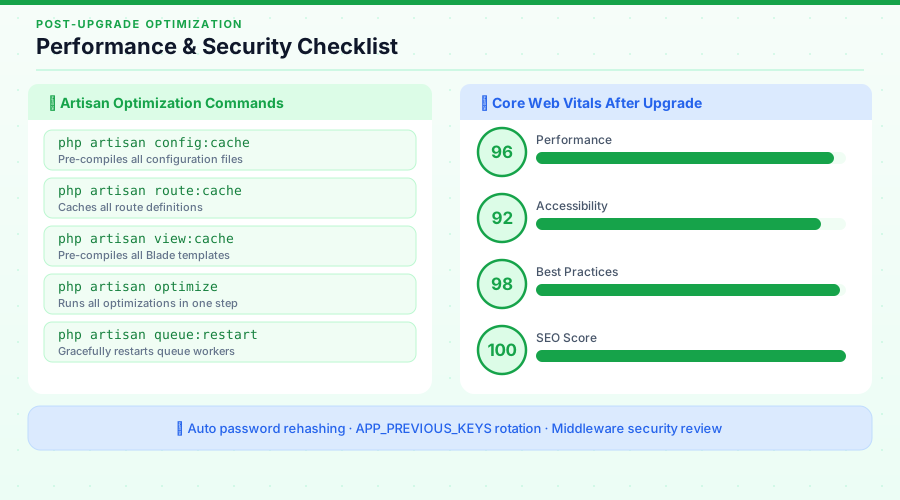
A framework update can occasionally affect your server response times, which feeds into LCP (Largest Contentful Paint). After upgrading, re-run your app through PageSpeed Insights and Google Search Console's Core Web Vitals report.
Optimize Configuration & Caching
php artisan config:cache
php artisan route:cache
php artisan view:cache
php artisan optimize
Run these commands after deploying to production. They pre-compile configuration, routes, and views for maximum speed.
Security Hardening Post-Upgrade
Laravel 11 introduced automatic password rehashing. When a user logs in, if their password hash was generated with old bcrypt work factor settings, Laravel silently rehashes it to the current standard. This is great for security and requires no developer action, but it's worth knowing it's happening.
Encryption key rotation also new in Laravel 11, lets you rotate your APP_KEY without invalidating existing encrypted data:
APP_KEY=base64:newkey==
APP_PREVIOUS_KEYS=base64:oldkey==
Review your middleware stack for any security headers you may have previously added manually. Laravel's defaults have improved, and you may have duplication.
Staging → Production Deployment Checklist
- All tests pass in staging
- Migrations previewed with
--pretend - Config cache cleared and rebuilt
- Route cache cleared and rebuilt
- Queue workers restarted:
php artisan queue:restart - Scheduled task cron verified
- PageSpeed score checked
- Error logging monitoring active (Telescope, Sentry, or Bugsnag)
- Database backup confirmed
Conclusion
Upgrading Laravel feels like a lot until you've done it a few times. Then it becomes routine. A checklist, a branch, a few hours of careful work, and a staging environment that lets you verify before the world sees it.
The Laravel team has made upgrades progressively cleaner with every release. Laravel 11's simplified structure removed complexity that never needed to exist. Laravel 12 sharpens the developer experience further and opens doors to AI-powered features that are genuinely exciting to build with.
Start with a backup. Work in a branch. Use your staging environment like it exists for a reason. And if you're managing multiple client projects or a larger codebase, let Laravel Shift handle the mechanical parts so you can focus on the decisions that actually require your judgment.
You'll get through this upgrade in better shape than you found it and that's exactly the point.
Built something interesting with Laravel 12 or need help managing a complex upgrade across multiple environments? Get in touch, happy to help you get through it cleanly.


