
My Complete Tech Stack for WordPress, Laravel & PHP Projects
Introduction: Why Your Tech Stack Matters in 2026
Choosing the right tech stack is one of the most important decisions in any web project. Whether you're building a business website, SaaS product, custom dashboard or high-converting landing page, your stack directly impacts performance, scalability, SEO, security and long-term maintenance.
Over the years, I've refined a powerful WordPress Laravel tech stack that allows me to build everything from conversion-focused websites to complex web applications. Instead of limiting myself to one ecosystem, I strategically combine WordPress (for flexibility and content management) with Laravel (for structured backend development and scalability).
If you're wondering when to choose one over the other, I've already broken it down in detail in my Laravel vs WordPress comparison
In this guide, I'll walk you through:
- My backend stack
- WordPress setup
- Frontend architecture
- Infrastructure & DevOps
- Performance optimization
- Security layers
- SEO & conversion integration
- Scaling strategy
This is the exact stack I use for professional client projects.
What Is a WordPress + Laravel Hybrid Tech Stack?
A hybrid WordPress Laravel tech stack combines:
- WordPress as a CMS
- Laravel as a custom backend framework
- API-driven architecture
- Modern frontend tools
There are three common models I use:
1️⃣ Standard CMS Model
WordPress handles content, marketing pages, and blogs.
2️⃣ Framework Model
Laravel powers dashboards, SaaS systems, CRMs, booking engines, or custom applications.
3️⃣ Hybrid API Model
WordPress acts as a headless CMS, while Laravel consumes content via REST API for more advanced logic.
This approach gives:
- Content flexibility
- Application scalability
- Cleaner architecture
- Better long-term maintainability
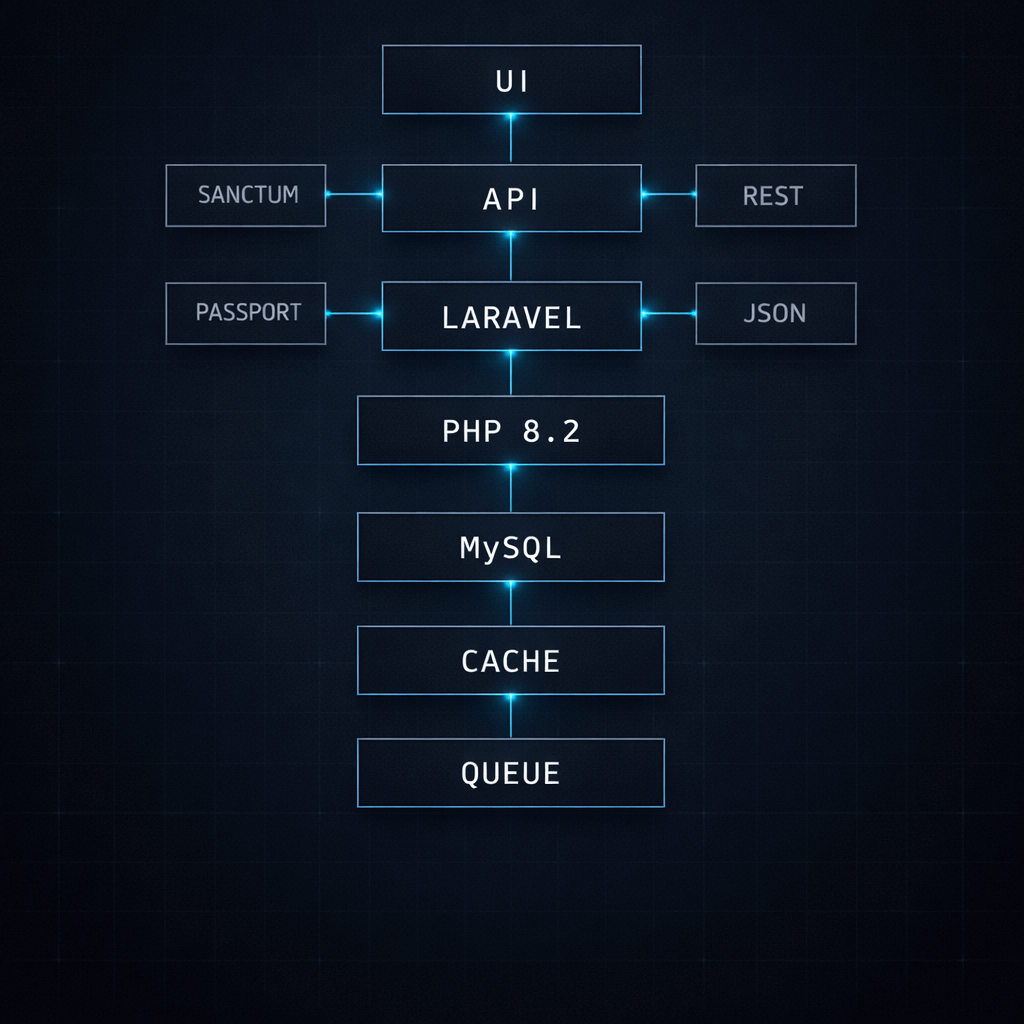
My Core Backend Stack (Laravel + PHP)
PHP Runtime Environment
I use:
- PHP 8.2+
- OPcache enabled
- Composer for dependency management
Modern PHP has dramatically improved performance. With proper configuration, it can compete with many modern backend languages in execution speed.
Laravel Framework Setup
Laravel is my primary backend framework because it provides structure and scalability.
Core components I rely on:
- MVC architecture
- Eloquent ORM
- Middleware
- Job Queues
- Laravel Scheduler
- RESTful API development
- Service-based architecture
For authentication, I use:
- Laravel Sanctum (for SPA or API tokens)
- Laravel Passport (for OAuth when needed)
Laravel allows me to build clean, testable, scalable systems without plugin dependency chaos.
For deeper technical understanding, I always reference the Laravel official documentation.
API Integration Strategy
When combining WordPress and Laravel:
- WordPress REST API delivers content
- Laravel consumes endpoints securely
- Custom endpoints are created when needed
- JSON responses optimized for frontend consumption
This is especially powerful for:
- Membership platforms
- Headless blog systems
- Custom dashboards
- Multi-vendor applications
My WordPress Development Stack
WordPress Core Setup
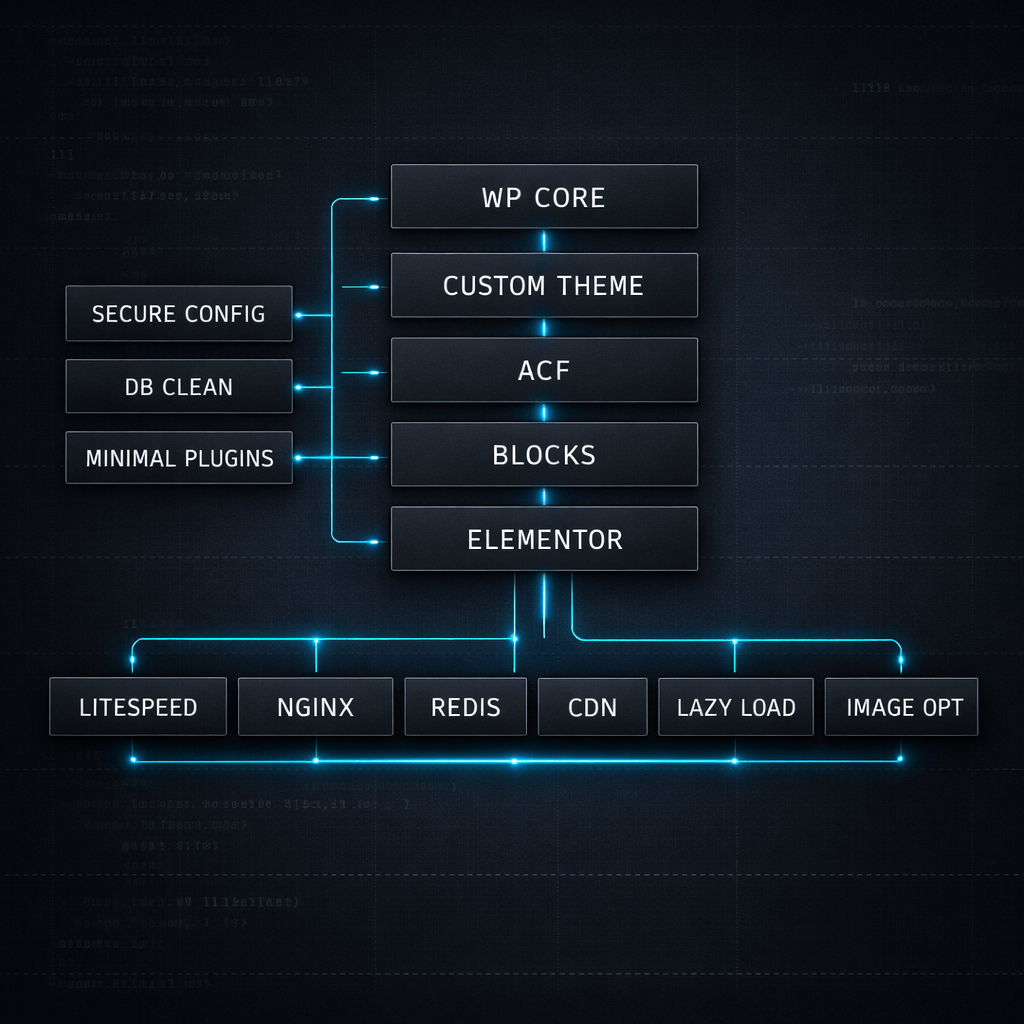
My WordPress stack is optimized, minimal, and performance-focused.
I avoid plugin overload. Instead:
- Custom theme development
- Only essential plugins
- Secure configuration
- Database cleanup routines
For technical standards, I rely on WordPress developer documentation.
Page Builders & Custom Blocks
Depending on the project:
- Elementor (for fast marketing builds)
- Gutenberg custom blocks
- Advanced Custom Fields (ACF)
But I avoid heavy themes that reduce performance.
Performance Optimization in WordPress
Performance is not optional. It directly affects SEO and conversions.
I implement:
- LiteSpeed or NGINX server
- Redis object caching
- Image compression
- Lazy loading
- CDN integration
I apply UI/UX principles that improve conversions as well. You can explore my detailed approach.
My Frontend Stack (Modern UI Layer)
Frontend impacts both performance and user psychology.
Core Technologies
- HTML5 semantic markup
- CSS3
- Bootstrap 5
- Tailwind (selective use)
I prioritize clean code over visual bloat.
JavaScript Stack
- Vanilla JavaScript
- Alpine.js (lightweight reactivity)
- Vue.js (for Laravel applications)
I avoid overengineering with massive frameworks unless required.
UI/UX & Conversion Layer
My frontend decisions are always tied to:
- Conversion rate optimization
- Page speed
- Accessibility
- Mobile-first design
- Clear CTAs
Every design decision must improve business metrics not just aesthetics.
Database & Infrastructure Stack

Database Layer
I use:
- MySQL
- MariaDB (depending on hosting)
- Proper indexing
- Query optimization
- Relationship normalization
For Laravel projects, Eloquent ORM simplifies relationships while maintaining performance.
Hosting Stack
Most projects run on:
- VPS (DigitalOcean)
- AWS (for scaling)
- CyberPanel for server management
VPS gives me control over:
- Server optimization
- Resource allocation
- Security configuration
Shared hosting is avoided for serious projects.
DevOps & Deployment
My deployment workflow:
- Git-based version control
- Separate staging environment
- Testing before production push
- Database migration management
- Backup before updates
This ensures stable releases and safer updates.
Security Stack
Security is layered not single-tool based.
Laravel Security
- CSRF protection
- SQL injection prevention
- Authentication middleware
- Rate limiting
WordPress Security
- File permission hardening
- XML-RPC restriction
- Login attempt limits
- Database prefix customization
Server-Level Security
- Firewall rules
- SSL certificates
- Regular backups
- Server monitoring
Security impacts SEO trust and business credibility.

Performance Optimization Stack
Speed affects ranking and revenue.
According to Google Core Web Vitals guidelines, Page speed is a ranking factor.
Server-Level Optimization
- NGINX tuning
- GZIP / Brotli compression
- HTTP/2
- PHP-FPM tuning
Application-Level Optimization
- Query optimization
- Cache layers
- Redis implementation
- Queue workers
Frontend Optimization
- Minified CSS & JS
- Critical CSS loading
- Preload fonts
- Lazy-loaded media
All projects are tested against Core Web Vitals.
SEO & Conversion Integration
A WordPress Laravel tech stack must support SEO from the foundation.
I implement:
- Clean URL structures
- Schema markup
- XML sitemaps
- Proper heading hierarchy
- Structured internal linking
You can see examples of my real work.
For more about my background, SEO is not an afterthought, it's part of the architecture.
When I Choose WordPress vs Laravel
WordPress When:
- Marketing website
- Blog-heavy site
- Fast deployment required
- Non-technical client editing needed
Laravel When:
- SaaS product
- Custom CRM
- Marketplace
- Booking systems
- Complex database relationships
Hybrid When:
- CMS + custom dashboard
- Enterprise systems
- API-driven applications
For deeper comparison, refer again to: Laravel vs WordPress: When to Choose Which?
Scaling Strategy for Growing Projects
As traffic grows, architecture must evolve.
I implement:
- Horizontal scaling
- Load balancers
- Separate database servers
- Dedicated queue workers
- CDN integration
Laravel makes scaling structured. WordPress scales well with caching and VPS tuning.
My Complete Development Workflow
1️⃣ Requirement analysis
2️⃣ Wireframing
3️⃣ Database planning
4️⃣ Backend development
5️⃣ Frontend implementation
6️⃣ Performance optimization
7️⃣ Testing
8️⃣ Deployment
9️⃣ Monitoring
If you're planning a project, you can start a consultation.
Conclusion: A Balanced Stack for Performance & Growth
My complete WordPress Laravel tech stack is designed for:
- Performance
- Scalability
- Security
- Conversion optimization
- SEO growth
Instead of choosing one ecosystem blindly, I use the right tool for the right problem.
This hybrid approach allows me to build:
- Fast marketing sites
- Scalable SaaS platforms
- Custom enterprise systems
- Conversion-driven landing pages
If you're planning a project and want a scalable, performance-driven architecture, let's discuss your goals.


